SafeBay platform
Maritime AI-assisted software for technical and safety management.
The film
SafeBay in under seven minutes
Nine chapters, from the platform to SafeBay AI at work. Start anywhere: the film keeps playing in the corner while you read on.
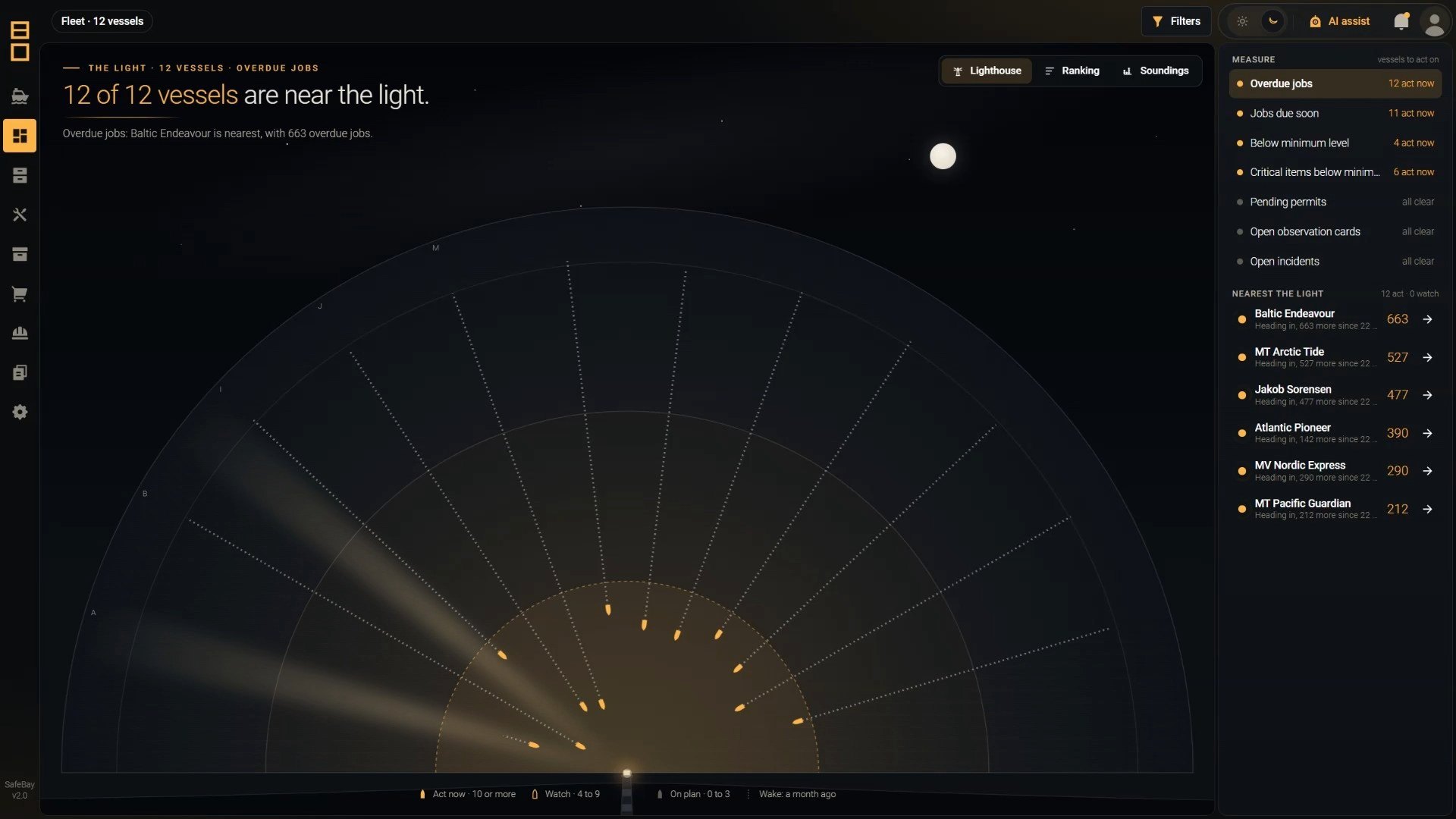
Platform
One PMS-first platform, with AI built in
AI agent
Ask in plain English about one vessel or the whole fleet. It works out the steps itself, and answers from your live SafeBay data and your own documents, with the source for every fact.
AI plugins
Eight plugins are included. Custom plugins, built for your company, can take SafeBay AI beyond the CMMS: from supplier quotations to integrations with other systems and onboard hardware.
Maintenance
Planned and unplanned maintenance in one workflow: equipment, running hours, jobs and follow-up, linked to documents, stock and purchasing.
Stock control
Spare parts, consumables and tools with locations, usage history, minimum stock and shortages, linked to jobs and equipment.
Purchasing
Requisitions from maintenance and stock demand, with approval flow, budget codes, external purchasing systems and stock updates on receipt.
Documents
Company and vessel documents and certificates, with approval workflow, revision control, publishing and archive.
Library
Manuals, drawings and catalogues in one place, linked to equipment and jobs, so crews always find the right information.
Control of work
Permits to work, risk assessments, toolbox talks, lockout-tagout and checklists, from planning to close-out.
Incident reports
Configurable incident reporting: the office is notified, users are guided through the next steps, and close-out needs office approval.
Observation cards
Hazard observations, anonymous if needed, each with documented follow-up before closure and quality scoring.
SafeBay AI
Your fleet, one question away
It does not guess. It reads the real records, does the calculation, checks every figure against what it read, and shows where each fact came from. Pick a question to see how it answers.
Planned maintenance
Safety and QHSE
Which vessels have overdue jobs on critical equipment right now? Group them by vessel and department, and give me an Excel file.
Here are the overdue jobs on critical equipment, grouped by vessel and department. Each job is a link that opens it in SafeBay, on the right vessel.
- Reading maintenance jobs and equipment
- Checking every figure against the records
Here are the overdue jobs on critical equipment, grouped by vessel and department. Each job is a link that opens it in SafeBay, on the right vessel.
- Reading the work reports, not just the counts
- Grouping the causes the crews wrote
Here is the equipment with the most unplanned work across the fleet, with the causes in the crews' own words. Every work report is linked.
- Reading spare parts and stock levels
Here are the spare parts below their minimum stock, vessel by vessel. Each part links to its record in SafeBay.
- Reading vessel and company certificates
Here are the certificates that expire in the next 90 days, for the company and for every vessel you manage, sorted by date.
- Reading each permit with its risk assessment, toolbox talk, checklists and LOTO forms
- Judging whether the work was really planned and controlled
- Scoring each permit
Each permit is scored, with its strengths and its gaps. The PDF report is ready. Shall I email it?
- Reading your company's risk assessment library
- Preparing the draft
Here is a draft built from your company's own risk assessment library. Review it, and I will save it into SafeBay when you confirm.
- Searching your SMS and procedures
Here are the steps your SMS requires before bunkering, each with the document and the page it comes from.
90%
Faster compliance paperwork in selected workflows*
- Digital forms
- AI-assisted completion
- Instant retrieval
*Based on 8bitOcean studies in selected use cases.
Under control
Practical AI, controlled by people
Your rights, your view
It reads SafeBay as the person asking: an office user sees their vessels, the crew see their own vessel.
It calculates, it does not guess
It runs its own analysis over the records, and every number is checked against the data before it is shown.
Nothing changes without a yes
Creating a record or sending a report always waits for the user's confirmation.
You see every step
The user sees each step while it works and can stop it at any time.
Predictable cost
A daily AI budget per vessel keeps costs under control.
Private files
A file it produces is kept for the person who asked, and only them.
Built in
Eight built-in plugins
They come as standard with SafeBay AI and cover PMS, documents, safety and reports.
SafeBay Help
Ask how to do anything in SafeBay; the answer comes from the product manual.
Fleet Data
Live answers from your SafeBay records, from maintenance jobs and running hours to permits and incidents.
Document Search
SMS manuals, procedures, maker manuals and circulars, kept up to date. Answers name the document and page.
File Export
Excel workbooks, Word reports and PowerPoint decks in a clean, branded layout.
Risk Assessment
Answers from your generic risk assessment library; Task Risk Assessments saved into SafeBay once you confirm.
Permit Audit
Audits permits to work and everything filed under them; the report is emailed once you confirm.
Memory
Remembers each user's preferences and ways of working, so the system adapts to each person over time.
Emails the reports it prepares once you confirm.
Your own plugins
For the work the eight do not cover. Examples below.
Beyond the CMMS
Custom plugins: the AI at work outside the CMMS
Each gives SafeBay AI a new ability for one company, on its dedicated server, with the same rights, confirmations and sources. Examples of what one can do:
Email handling
The AI reads every supplier and maker email, files it against the right requisition or job, updates the record and drafts the reply for you to approve.
Requests for quotation
The AI turns a requisition into RFQs, chases the suppliers who have not replied, and lays out price, delivery and terms side by side, ready for your decision.
Hardware integrations
The AI watches readings from onboard equipment and monitoring systems, spots a trend before it becomes a failure, and opens the maintenance job with the machine's history attached.
ERP and accounting
The AI matches invoices to purchase orders and deliveries, flags every mismatch, and keeps budget against actual spend up to date for each vessel.
Crewing system
The AI checks every planned crew change against certificates, training and the vessel's requirements, and raises the gaps before anyone joins.
Voyage and performance
The AI turns noon reports into fuel, CII, EU ETS and MRV figures, flags the outliers and prepares the reports, with the source for every number.
Vetting and inspections
Before SIRE 2.0, CDI, TMSA, RightShip, class, flag or PSC, the AI collects the evidence from every module into one pack, lists the gaps and opens the follow-up jobs.
Morning brief
Every morning the AI writes each manager a brief on their vessels: critical jobs that fell overdue overnight, certificates about to expire and what needs a decision today.
It adapts
Over time, SafeBay AI becomes your own
It adapts to your company and to each user. What it learns is kept as your knowledge, not trained into a model, so the longer you use it, the better it fits your work.
Your company
Adapts to how you work
- Your SMS, procedures and manuals become its knowledge base
- Company guidance shapes reports and risk assessments, and outranks personal preferences
- Risk assessments drafted from your own library
- Revised procedures and manuals are picked up automatically
Each user
Adapts to each person
- Say it once: “I look after the tankers.”Remembered
- “Always give me tables in Excel.”Applied next time
- No set-up: a short note confirms it
- Each person's memory is theirs alone
Memory updated
Infrastructure
Cloud-based, with an offline ship version
SafeBay runs in the cloud, on a dedicated server for your company. For vessels with limited connectivity, an offline ship version keeps working and syncs data when the link allows.
SafeBay cloud
- Server
- A dedicated server for each company
- AI models
- Commercial models via API, or open-weights models on rented servers
- Local AI
- Possible with the right setup: SafeBay AI runs entirely on your company's own servers, open-weights model included
- Integrations
- REST API to the systems you keep
Offline ship version
- Offline
- The SafeBay modules work offline on a ship server, for limited connectivity
- Data sync
- Records sync with the cloud when the connection allows
- Connections
- Vessel LAN; the modules need no internet for daily work
Users, ashore and on board
- Device
- Any: phone, tablet, laptop or desktop
- Software
- Nothing to install: SafeBay runs in the browser
- Rights
- Each user sees only what they are allowed to see